
How to Reset a Ninja Air Fryer (No Reset Button Needed)
Ninja air fryers don’t have a reset button. To reset one, unplug it, wait 10–15 minutes, then plug it straight into a wall outlet and start a program again. That clears the controls and lets the overheat protection reset once the unit has cooled. If it shut off mid-cook, give it a full 30 minutes to cool before trying again. If it still won’t work after a reset, the problem is a fault rather than a glitch.
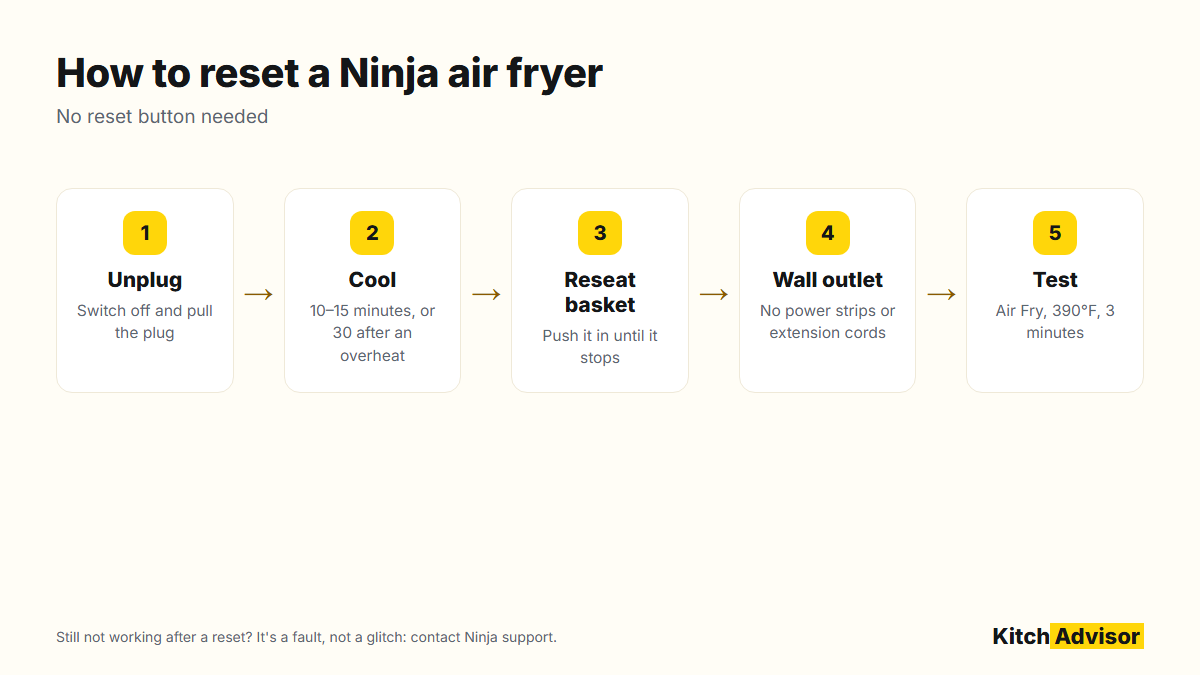
How to reset a Ninja air fryer
- Turn it off and unplug it from the wall.
- Pull the basket out so the unit cools faster, and empty any grease.
- Wait 10–15 minutes, or 30 minutes if it shut itself off while cooking.
- Push the basket fully back in until it stops. The unit won’t run without it.
- Plug it straight into a wall outlet, not a power strip or extension cord.
- Start a short test: Air Fry at 390°F for 3 minutes. You should feel warm air from the vents.
When a reset helps, and when it doesn’t
| Problem | Will a reset help? | Next step if not |
|---|---|---|
| Frozen or unresponsive display | Usually yes | Try a different outlet |
| Shut off during cooking | Yes, after cooling (overheat protection) | Clear the vents, leave 5 inches of space around it |
| Buttons do nothing | Sometimes | Check the basket is fully in |
| Fan runs, no heat | Rarely | Not-heating fixes, then support |
| Completely dead | No | Not-turning-on fixes: outlet, breaker, cord |
Dual-zone models
On dual-basket Ninja Foodi models, the reset is the same: unplug, wait, plug back in. Afterward, select each zone, set its time and temperature, and press Start. If only one zone misbehaves after a reset, check that drawer is fully seated, then contact Ninja.
Prevent it happening again
- Keep at least 5 inches of space behind and above the air fryer.
- Don’t overfill the basket; airflow keeps the unit cool.
- Clean grease from the basket and element area regularly. See how to clean a Ninja air fryer.
- Use a dedicated wall outlet; air fryers draw a lot of power.
Manuals and warranty help for your model are on SharkNinja’s support site.
Quick Troubleshooting Table
| What you see | Likely cause | What to try |
| Frozen screen or dead buttons | Control glitch | Unplug for 10 to 15 minutes, then plug back in |
| Turns off during cooking | Basket not fully in, or overheating | Push the basket in fully and clear the vents |
| Error code on display | Sensor or heat warning | Unplug, cool down, and check the code in the manual |
| No power | Outlet or breaker | Try another wall outlet and check the breaker |
| Fan runs but no heat | Heating fault | Stop using it and contact Ninja support |
Safe Reset Checklist
- Switch off and unplug the air fryer.
- Remove the basket and let everything cool down fully.
- Clean crumbs and grease from the basket and around the drawer opening.
- Plug directly into a wall outlet.
- Run a short test at a medium temperature with the basket fully closed.
If the same problem keeps coming back after a reset, it is likely a hardware issue. Contact Ninja support, especially while the fryer is under warranty.
FAQ
Does a Ninja air fryer have a reset button?
No. Unplugging it for 10–15 minutes does the same job as a reset button.
How long should I unplug my Ninja air fryer to reset it?
At least 10–15 minutes. If it shut off from overheating, wait about 30 minutes so it’s fully cool.
Why did my Ninja air fryer turn off by itself?
Most often the overheat protection tripped because the vents were blocked or the basket was overloaded. It can also happen if the basket was pulled out or the timer ran out.
Will resetting delete my settings?
Ninja air fryers don’t store custom programs, so there’s nothing to lose. You’ll just set the time and temperature again.