How to Reset a Cosori Air Fryer (Error Codes and Frozen Screens)
To reset a Cosori air fryer, unplug it, wait 10–15 minutes (30 if it overheated), then plug it straight into a wall outlet, push the basket fully in and start a short program. Cosori air fryers don’t have a reset button. If an error code shows, note it before resetting; if the same code comes back, check your manual or contact Cosori. If the touch buttons don’t respond, check that the control lock isn’t on (if your model has one) and that the panel is clean and dry.
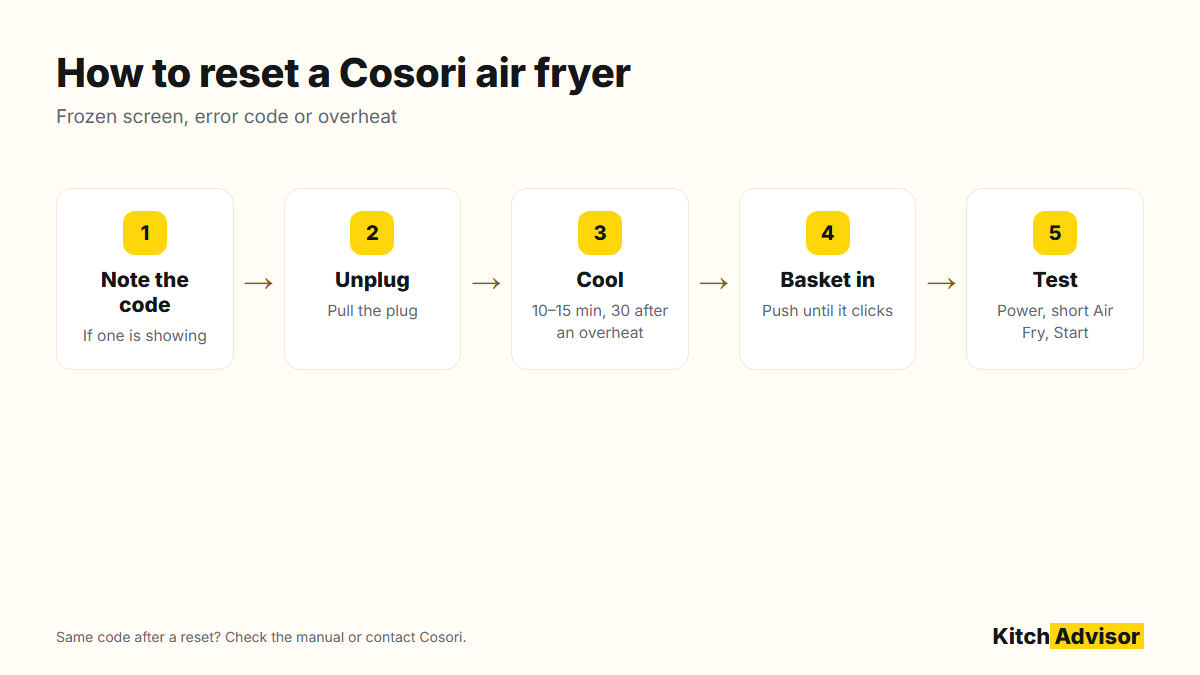
How to reset a Cosori air fryer
- Note any error code on the display.
- Unplug the air fryer.
- Pull the basket out and wait 10–15 minutes (30 after an overheat).
- Push the basket back in until it clicks.
- Plug into a wall outlet, press power, set a short Air Fry and press Start.
When a reset helps
| Problem | Reset helps? | If not |
|---|---|---|
| Frozen screen | Usually | Try another outlet |
| Error code | Sometimes | Note it; check the manual or contact Cosori |
| Buttons don’t respond | Sometimes | Turn off the control lock if fitted; clean and dry the panel |
| Shut off mid-cook | Yes, after cooling | Give it more space around the vents |
| Fan runs, no heat | Rarely | Contact Cosori |
Manuals and support for each model are on Cosori’s website.
Related Cosori guides
- Cosori air fryer not turning on
- Cosori control panel not working
- How to turn off the beep on a Cosori air fryer
- How to clean a Cosori air fryer
FAQ
Does Cosori have a reset button?
No. Unplugging for 10–15 minutes resets the controls.
How do I clear an error code on my Cosori?
Unplug it, let it cool and plug it back in. If the same code returns, look it up in your manual or contact Cosori.
Why won’t my Cosori buttons respond?
The control lock may be on, or the panel may be wet or greasy. Clean and dry it, check the lock, and reset by unplugging.
Will resetting erase my Cosori presets?
Built-in presets stay. Any custom changes may return to default on some models.